We spent two days testing Tencent’s new OS-level AI assistant, Marvis (马维斯). Here’s an honest look at its multi-agent architecture, file automation, system control, pros, cons, and who should (or shouldn’t) install it.
On May 20, 2026, Tencent quietly rolled out Marvis (马维斯 / Mǎwéisī)—a cross-platform AI assistant for Windows, macOS, and Android. No waitlist, no invite code—just download and go.
Unlike typical chatbots, Marvis brands itself as an OS-level AI assistant. It doesn’t just talk; it can operateyour computer—organizing files, changing system settings, launching apps, browsing the web, and even offering remote control. Think of it as a localized AI butler living inside your OS.
I installed it and used it heavily for two days. Here’s the unvarnished verdict.
Installation & UI: Clean, But Resource-Hungry
Installers for Windows and macOS are straightforward—next-next-finish, no bloatware.
On first launch, Marvis performs a full-disk scan to build a local knowledge base for semantic file search and document understanding. On my file-heavy machine it took ~10 minutes, with noticeable CPU/RAM spikes. Machines with less than 8GB RAM will feel the lag—16GB+ is recommended.
The UI is minimal: left sidebar for functions, center chat area, bottom input bar. No ads. A nice touch: you can toggle between Efficiency Mode (cloud) and Privacy Mode (local-only processing).
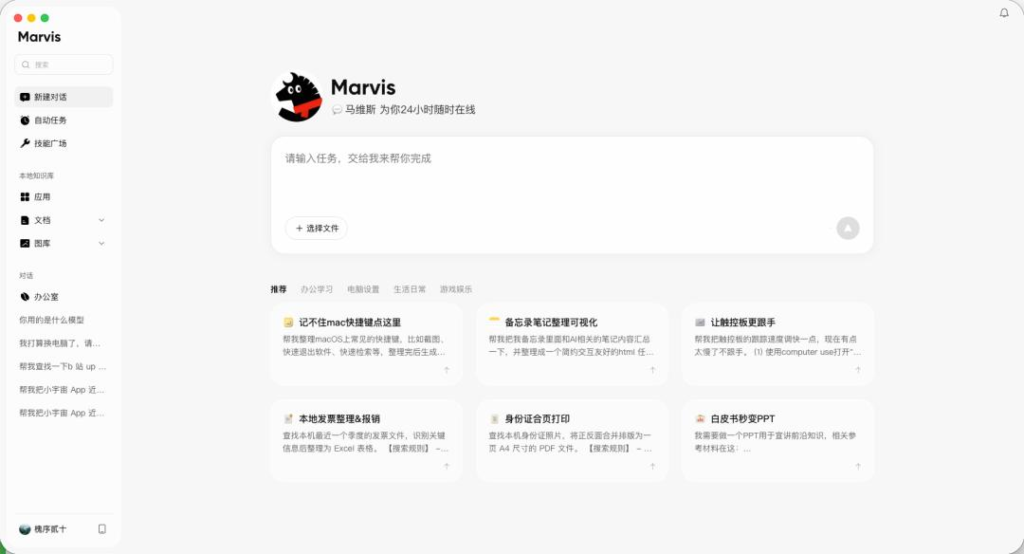
Core Architecture: 6 Agents Working as a Team
Marvis isn’t a single chatbot—it uses a Lead Agent + 5 Specialist Agents model:
- Lead (Supervisor) Agent – Parses intent, breaks down tasks, dispatches subtasks
- File Agent – Search, organize, archive, read & convert documents
- Computer Agent – Adjust system settings, resolution, startup items, cleanup
- App Agent – Open software, click buttons, fill forms
- Browser Agent – Web browsing, data scraping
- Search Agent – Online lookup & summarization
This mirrors the emerging “Model + Harness = Agent” philosophy—task decomposition + tool use + multi-agent orchestration.
Real-World Testing
1. File Organization
- “Move all screenshots from desktop to ‘Screenshot Archive’ folder”→ Done in 4 sec, 100% accurate ✅
- “Sort desktop files into Work / Study / Life”→ Sorted, but misclassified some PDFs as images and deleted shortcuts ⚠️
- “Summarize this 1,000-word Word doc”→ 200-word summary, missed key points, wordier than ChatGPT ❌
Verdict: Simple file moves? Great. Complex classification or deep doc understanding? Not there yet.
2. System Settings (Best Part)
- “Set power plan to High Performance”→ Popped up confirmation, one click ✅
- “Disable unnecessary startup items”→ Listed items with recommendations, one-click disable ✅
- “My PC is slow lately, check why”→ Opened Task Manager, identified a Chrome extension eating 3GB RAM, gave clear advice ✅
Verdict: A blessing for non-tech users. Even power users save time.
3. Scheduled Tasks
- Daily 9 AM tech news push → On time, with source links ✅
- Friday 6:30 PM email report with attachment→ Email sent, but attachment failed or path error ⚠️
Verdict: Text-based scheduling works. File attachments are buggy.
4. Cross-Device Remote Control
Scan QR code on phone → view screen, control mouse/keyboard, transfer files.
- Latency: 3+ seconds, typing feels choppy
- 1GB file transfer: ~10 min (slower than WeChat)
Verdict: Fine for emergencies. Not a TeamViewer replacement.
✅ Pros — Why You Should Try It
- True OS integration – Does what chat-only AIs can’t: system ops, file management
- Clear multi-agent分工 (division of labor) – More capable than single-dialogue bots
- Optional privacy mode – Sensitive files stay local
- Completely free – Generous token allowance for personal use
- Beginner-friendly – Preset quick commands, no prompt engineering needed
❌ Cons — What Needs Work
- High memory footprint (8GB machines will stutter)
- Unstable with complex file classification, doc parsing, or email attachments
- Remote control has noticeable lag and limited polish
- AI “reasoning” weaker than top-tier LLMs on long-context tasks
- Early ecosystem — few third-party plugins or custom workflows
Who Is It For?
✔ Good for:
- Non-tech users who fear the Control Panel or messy desktops
- Students / light office workers — file tidying, simple summaries, reminders
- Occasional remote-access needs (check home PC, grab a file)
- Privacy-conscious users wanting local processing
✘ Not ideal for:
- Heavy coders / writers needing deep reasoning & long-context comprehension
- Users needing low-latency, high-precision remote control (design, editing, gaming)
- Older PCs with ≤8GB RAM
Final Verdict
Marvis isn’t Tony Stark’s JARVIS—yet. But it isone of the few Chinese-made AI tools attempting genuine OS-level integration rather than wrapping a chatbot in a window.
Its value lies in combining LLM + Agent Framework + System Tooling to handle the dirty, repetitive work—sorting files, toggling settings, finding things—freeing up your attention for the rest.
Worth installing if you’re a casual/power-curious user. Wait for a few more iterations if you need enterprise-grade reliability or heavy-duty reasoning.